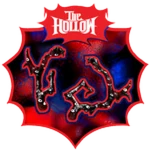
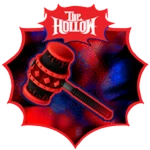
Quick answer: Roblox players still have time to collect eligible free avatar items from The Hollow, the 2026 Halloween survival event. The official event page says reward collection continues until noon Pacific time on November 2, 2026. Prioritize rewards you can earn through the hub’s maze quests and participating games, including Lord Umberhallow BLOXikin, Witches Brew-nado, All-Seeking Antlers, The Beasthammer, Fuwatty Side Satchel, and Reeling Petal Garland. Complete the requirement shown in-game, follow any separate claim prompt, and verify each item in your avatar inventory.
Updated October 26, 2026 · For U.S. Roblox players · By Shivam Das
One important distinction: November 2 is the deadline to collect eligible event rewards, not a promise that items already claimed will disappear from your inventory. Roblox’s official announcement says “anything you find is yours to keep.” Also, not every Halloween-looking item is free: some Marketplace cosmetics are paid, while certain rewards depend on quests, tickets, or another player’s item launcher.
Which free The Hollow items should you prioritize?
The best first targets are rewards with a clear task you can complete yourself. The Hollow’s hub has floor-based puzzles, while participating experiences have their own event objectives. Some rewards depend on another player launching a ghost, so they are better treated as bonuses than as guaranteed goals for a short session.
| Item | Where to earn it | Reported requirement | Priority |
|---|---|---|---|
| Lord Umberhallow BLOXikin | The Hollow hub | Complete the Floor 1 puzzle and return with the relic | High: self-directed hub quest |
| Witches Brew-nado | The Hollow hub | Complete the Floor 2 pillar puzzle, take the relic, and return to the elevator | High: self-directed hub quest |
| All-Seeking Antlers | DOORS event quest | Complete the event’s Candy Vault objective; check the current quest text for the exact conditions | High if you already play DOORS |
| The Beasthammer | Flee the Facility | Community guides report depositing 100 Candies during matches; confirm the live quest requirement | High if you enjoy the game |
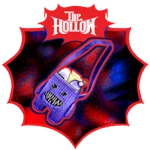
| Fuwatty Side Satchel | AOONI Nightmare | Collect 50 Pumpkins, then return to The Hollow to claim it | Medium: cross-game task |
| Reeling Petal Garland | Dandy’s World | Collect 200 Pumpkins, then follow the event’s claim steps | Medium: longer collection target |
Verification note: Roblox’s official announcement confirms the event, its quest-based rewards, the nine featured monsters, and the collection deadline. The item names and task details in the table are reported in current third-party walkthroughs and may change. Treat the objective panel in the live game as the final authority if it differs from a guide.
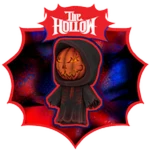
1. Start with the hub rewards you can control
If you have limited time, begin in the official The Hollow experience by Roblox Presents. Use the elevator to select an available floor, read the current objective, and search for the clues or puzzle pieces the game requests. Avoid copying a fixed route from an older video: maze details and clue locations may vary between runs.
- Enter the official experience, not a similarly named fan-made game.
- Read the floor objective and identify what counts as completion.
- Explore methodically and record symbols or clues instead of guessing.
- Finish the puzzle and collect the relic or objective item.
- Return to the elevator or hub as instructed; escaping can be part of the completion condition.
- Check for a separate reward or claim prompt before leaving.
- Verify the item in the correct avatar inventory category.
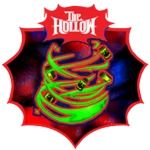
2. Pick participating-game quests that fit your play style
Cross-game rewards can be worth pursuing, but estimate the time before committing. If you already know DOORS, Dandy’s World, Flee the Facility, or AOONI Nightmare, you may progress faster than a player learning the controls from scratch. If you are new to a game, start by opening its in-game event quest and checking the target before you begin grinding.
All-Seeking Antlers: check the DOORS objective first
Current walkthroughs associate All-Seeking Antlers with a DOORS event quest. Because the exact challenge conditions can be specific, read the live quest panel rather than relying on a shortened social-media clip. After completing it, return to The Hollow if the game asks you to claim the reward there.
The Beasthammer: track progress during Flee the Facility matches
Third-party guides report that The Beasthammer quest involves depositing 100 Candies during Flee the Facility matches. Confirm the requirement in the current event quest and make sure your match progress is registering. If a task requires you to survive or escape as well, do not leave as soon as the candy target is reached.
Fuwatty Side Satchel and Reeling Petal Garland: do not forget the return step
Current guides associate Fuwatty Side Satchel with collecting 50 Pumpkins in AOONI Nightmare and Reeling Petal Garland with collecting 200 Pumpkins in Dandy’s World. These are collection goals, so keep an eye on the event counter rather than estimating from memory. After reaching the target, revisit The Hollow and follow any claim instructions; completing the outside-game task may not be the final step.
3. Treat ghost-launcher rewards as opportunistic bonuses
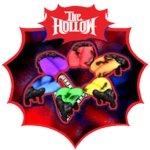
Some reported free items are obtained when eligible players launch collectible ghosts. These may be launched by a Star Creator, a developer, a Roblox administrator, or a Roblox Plus subscriber. You generally need to be nearby and interact with the ghost as directed. Because another player controls when and where a ghost appears, do not build your entire schedule around finding one. If you see an eligible launch while playing, take the opportunity; otherwise, work on a quest you can complete yourself.
Importantly, a launcher’s eligibility is not the same as the collector’s eligibility. Do not assume you need to buy Roblox Plus simply because an item is launched by a subscriber; check the current item prompt and official rules.
What is actually free—and what may cost you?
Roblox’s official announcement distinguishes quest-earned exclusive UGC from Halloween avatar items sold in the Marketplace. A seasonal design or an item shown in a promotional image is not automatically a free reward. Before spending time or Robux, check which path applies:
- Quest reward: complete the listed objective and any required claim step.
- Ticket-shop item: earn the required event currency and verify the price in the live hub.
- Roblox Plus benefit: check the membership requirement shown for that specific perk.
- Marketplace item: review the Robux price before purchasing; do not count it as free UGC.
- Social-media rumor: do not treat a screenshot, repost, or creator preview as proof of availability.
Official Roblox announcement and social post
Roblox’s October 21 announcement says The Hollow runs from October 22 through November 2, features nine monsters across nine nights, and awards exclusive UGC for completing quests. It also says players can keep what they earn. The event’s live finale is scheduled for October 31, but that is not the final reward-collection deadline.
Roblox’s official The Hollow announcement on X
Read the official Roblox Newsroom announcement and keep the live event hub open while claiming rewards. For additional context, see our guide to claiming The Hollow UGC and finding items in your inventory and our Hiachi reward-checklist article.
A 20-minute plan for players short on time
- Minutes 0–3: open the official hub and list rewards whose requirements are already unlocked.
- Minutes 3–12: start the shortest available hub objective or a participating-game quest you already understand.
- Minutes 12–17: finish the objective and complete the required return-to-hub or claim interaction.
- Minutes 17–20: verify the item in your avatar inventory and note what remains unfinished.
This is a planning framework, not a guarantee that every reward can be earned in 20 minutes. Maze layouts, server conditions, and quest progress can affect completion time. If you are close to finishing a quest, completing it is usually more efficient than switching games to start a new one.
How to avoid fake free-item claims
- Never enter your password, one-time code, or browser session cookie on a third-party reward site.
- Do not download executables or browser extensions that promise free UGC or Robux.
- Do not pay a stranger to “claim” an item for you.
- Verify the experience owner is Roblox Presents before joining The Hollow.
- If an item’s name, price, or requirement differs from a guide, trust the live game prompt and official Roblox information.
Frequently asked questions
When is the deadline for The Hollow rewards?
Roblox says players can continue collecting rewards until noon Pacific time on November 2, 2026. The October 31 finale is a separate event milestone, not the collection deadline.
Will free UGC items disappear from my inventory after the event?
Roblox’s official announcement says anything you find is yours to keep. The deadline is for collecting eligible rewards during the event; it does not say that already-claimed items are removed from your account.
Are all The Hollow avatar items free?
No. Some items are earned through quests, while Halloween-themed Marketplace items can be paid. Check the item’s price and requirement in Roblox before assuming it is free.
Do I need Roblox Plus to claim every free item?
Not every quest reward is described as a Plus benefit. Roblox Plus includes separate perks, and some ghost launches may come from subscribers. Check the eligibility text for each reward instead of assuming a subscription is always required.
What should I do if a reward does not appear?
Confirm the quest is complete, follow any separate claim prompt, return to the hub if instructed, and check the correct avatar inventory category. If it still does not appear, capture the in-game message and consult official Roblox support.
Are there official The Hollow promo codes?
Roblox’s launch announcement does not list a public promo-code system for The Hollow. Use the event’s quest and reward prompts, and avoid sites promising codes in exchange for your login.
Sources and further reading
- Roblox Newsroom: The Hollow Halloween survival event
- Roblox Developer Forum event announcement
- The Hollow official Roblox experience
- Bloxodes’ The Hollow free UGC item guide
- TechWiser’s The Hollow free UGC guide
Editorial note: The event deadline and general quest-reward mechanics are attributed to Roblox. Individual item names and task details are based on current third-party guides and should be checked against the live event. This article does not claim that every listed reward is guaranteed to remain available in every region or server.